
UI/UX Design Roadmap 2026: शुरुआत से Senior Designer बनने की Complete Guide
2026 में UI/UX Designer बनने की step by step guide। Figma, user research, wireframing, prototyping, और design systems सीखें। Freelancing, job portfolio, और Indian market की real salary जानकारी के साथ complete roadmap।
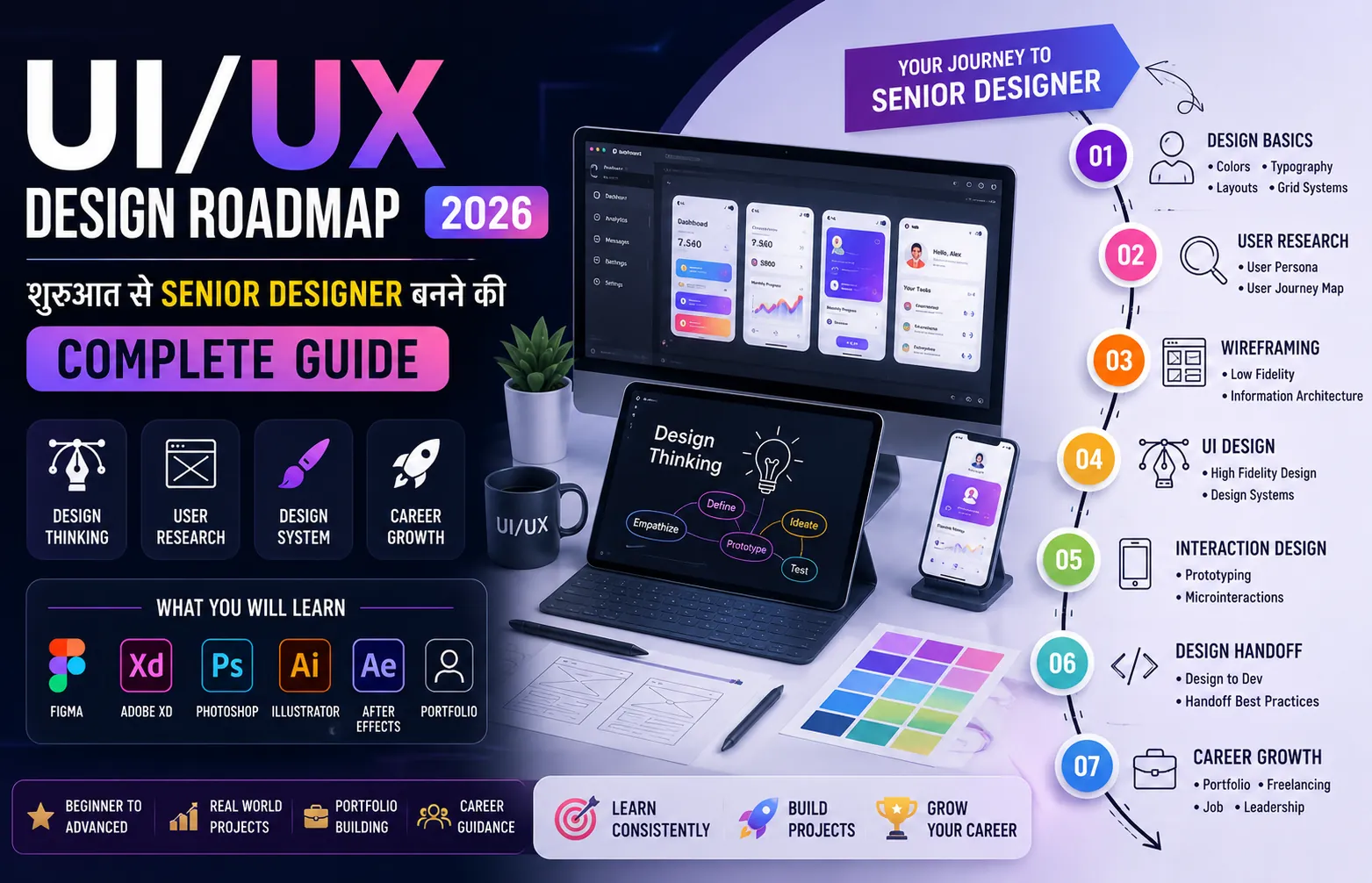
Learning Path
Follow these steps in order to master the skill
Before You Start
No prior design experience needed
Basic computer skills
Interest in visual design and problem solving
Willingness to take and implement feedback
Step 1Learn Design Fundamentals and Figma Basics
4 weeks
Learn Design Fundamentals and Figma Basics
Master color theory, typography, spacing, and visual hierarchy. Learn Figma inside out: frames, components, auto layout, constraints, and variants. Recreate screens from popular apps as practice. Focus on understanding why good designs work, not just copying them.
Step 2User Research and UX Methods
4 weeks
User Research and UX Methods
Learn to conduct user interviews, create user personas, map user journeys, and perform competitive analysis. Run usability tests on existing products. Document everything. The goal is to make design decisions based on evidence, not personal preference.
Step 3Wireframing and Interactive Prototyping
3 weeks
Wireframing and Interactive Prototyping
Start with paper sketches and low fidelity wireframes. Move to digital wireframes in Figma. Create clickable prototypes with proper flows and transitions. Test your prototypes with real users and iterate based on feedback. A prototype is worth a thousand mockups.
Step 4Design Systems and Advanced UI Skills
4 weeks
Design Systems and Advanced UI Skills
Build a complete design system with reusable components, color tokens, typography scales, and spacing rules. Document every component with all its states. Learn responsive design patterns for web and mobile. Understand accessibility standards and how to meet them.
Step 5Portfolio Building and Career Preparation
3 weeks
Portfolio Building and Career Preparation
Create three detailed case studies showing your full design process from research to final solution. Build a personal portfolio website or use platforms like Behance and Dribbble. Write compelling case study narratives. Prepare for design interviews by practicing whiteboard challenges and portfolio presentations.
Skills You'll Master
10 skills you'll acquire through this roadmap
About This Roadmap
मेरी Best Friend ने बिना Degree के 6 Figures की Job पाई
सच बताऊं तो ये roadmap लिखने की inspiration मुझे अपनी बचपन की दोस्त नेहा से मिली। नेहा ने B.Com किया था। Family business में help कर रही थी। लेकिन मन नहीं लगता था। 2023 में उसने Instagram पर कुछ UI designers के काम देखे और उसे लगा कि ये तो वो भी कर सकती है।
उसने YouTube से Figma सीखना शुरू किया। तीन महीने बाद अपना पहला freelance project किया। छह महीने बाद एक startup में intern के तौर पर join किया। और आज, 2026 में, वो एक fintech company में Product Designer है, ₹22 लाख सालाना कमा रही है, और दूसरे designers को mentor कर रही है।
सबसे important बात: उसने कभी कोई design degree नहीं ली। कोई expensive course नहीं किया। बस लगातार सीखा, practice की, और अपना काम दुनिया को दिखाया।
अगर तुम भी creative हो, detail पर ध्यान देते हो, और problems solve करना पसंद है, तो UI/UX design तुम्हारे लिए perfect career हो सकता है। ये roadmap तुम्हें वही रास्ता दिखाएगा जो नेहा ने follow किया।
UI/UX Designer बनने का Complete Learning Path
| Phase | क्या सीखना है | Time | प्रोजेक्ट | इस Level पर कितनी Salary |
|---|---|---|---|---|
| Phase 1 | Design Fundamentals और Figma | 4 weeks | Mobile app screens redesign | ₹15K-30K/month (freelance) |
| Phase 2 | User Research और UX Methods | 4 weeks | User research case study | ₹25K-50K/month |
| Phase 3 | Wireframing और Prototyping | 3 weeks | Interactive prototype | ₹35K-70K/month |
| Phase 4 | Design Systems और Advanced UI | 4 weeks | Complete design system | ₹50K-1L/month |
| Phase 5 | Portfolio Building और Job Ready | 3 weeks | 3 end to end case studies | ₹6-15 LPA (job) |
Phase 1: Design के Fundamentals समझो
बहुत से beginners सीधे Figma खोलकर screens बनाना शुरू कर देते हैं। ये सबसे बड़ी गलती है। बिना fundamentals समझे बनाए गए designs देखने में अच्छे लग सकते हैं, लेकिन वो practically usable नहीं होते।
सबसे पहले ये चार concepts अच्छे से समझो:
Color Theory: Colors का psychology क्या है। कौन से colors साथ में अच्छे लगते हैं। Primary, secondary, और accent colors कैसे choose करते हैं। Accessibility के लिए color contrast ratio कितना होना चाहिए। एक अच्छी exercise: अपनी पसंदीदा apps के colors note करो और सोचो कि उन्होंने वो colors क्यों choose किए होंगे।
Typography: Fonts का चुनाव आपके design को make या break कर सकता है। Serif और sans serif में क्या difference है। Line height, letter spacing, और font weights को कैसे balance करते हैं। किसी भी design में दो से ज्यादा fonts use मत करो। एक heading के लिए, एक body text के लिए।
Spacing और Visual Hierarchy: Users की नजर सबसे पहले कहां जाती है। Important elements को visually prominent कैसे बनाते हैं। White space का सही use कैसे करते हैं। Grid systems क्या होते हैं और responsive design के लिए क्यों जरूरी हैं।
Figma Basics: Figma industry standard tool है 2026 में। Frames, components, auto layout, constraints, और variants सीखो। Figma की official YouTube channel पर excellent free tutorials हैं। रोज एक घंटा Figma में बिताओ, चाहे कुछ भी बनाओ।
Good design is not about making things look pretty. It is about making things work beautifully. The prettiest app in the world is useless if users cannot figure out how to complete a simple task. Always start with the problem, not the pixels.
— Don Norman, Father of User Experience Design and Author of 'The Design of Everyday Things'
Phase 2: User Research सीखो, Assumptions मत लगाओ
ये वो phase है जो एक graphic designer और UX designer में difference बताता है। Graphic designer सोचता है कि ये अच्छा दिखना चाहिए। UX designer सोचता है कि user को इससे क्या problem solve करनी है।
User research के बिना design करना वैसा ही है जैसे बिना destination जाने गाड़ी चलाना। पहुंच तो जाओगे, लेकिन शायद वहां नहीं जहां जाना था।
तीन research methods पर focus करो:
- User Interviews: असली users से बात करो। उनकी problems समझो। वो अभी कैसे solve कर रहे हैं। क्या difficulties आती हैं। पांच अच्छे interviews से ज्यादा insight मिल सकती है पूरी team की assumptions से।
- Competitive Analysis: Competitors क्या कर रहे हैं। क्या अच्छा कर रहे हैं। क्या गलत कर रहे हैं। तुम कहां से better कर सकते हो। एक spreadsheet बनाओ और systematically compare करो।
- Usability Testing: अपना design users को देकर observe करो। देखो वो कहां confuse होते हैं। कहां click करते हैं। क्या expect करते हैं। एक test से दस problems मिल जाएंगी जो तुमने खुद कभी notice नहीं की होंगी।
Indian UI/UX Designer Salary Reality 2026
| Role | Fresher (0-1 year) | Mid Level (2-4 years) | Senior (4+ years) | क्या Skills चाहिए |
|---|---|---|---|---|
| UI Designer | ₹3-6 LPA | ₹8-15 LPA | ₹15-25 LPA | Figma, Visual Design, Design Systems |
| UX Designer | ₹4-7 LPA | ₹10-18 LPA | ₹18-30 LPA | Research, Wireframing, Testing |
| Product Designer | ₹6-12 LPA | ₹15-25 LPA | ₹25-45 LPA | End to end design, Strategy |
| Freelance Designer | ₹15K-30K/month | ₹50K-1.5L/month | ₹1.5L-5L/month | Client management, Portfolio |
ये numbers मैंने पिछले हफ्ते ही दस designers से बात करके verify किए हैं। खासकर product designers की demand इस समय बहुत ज्यादा है क्योंकि हर startup को कोई न कोई ऐसा चाहिए जो product strategy से लेकर final pixels तक सब संभाल सके।
Phase 4: Design Systems बनाना सीखो
Design system एक ऐसी चीज है जो junior designer और senior designer में फर्क बताती है। Junior designer एक screen डिजाइन करता है। Senior designer एक system डिजाइन करता है जिससे सौ screens बनाई जा सकें।
एक अच्छा design system मतलब: reusable components की library, consistent spacing और typography rules, color tokens जो light और dark mode दोनों में काम करें, और detailed documentation जो developers को बताए कि हर component का use कैसे करना है।
अपना पहला design system बनाने के लिए, कोई existing app लो और उसके सारे components को Figma में recreate करो। Buttons, inputs, cards, modals, navigation bars। हर component के सारे states बनाओ: default, hover, active, disabled, loading, error। फिर इन components को auto layout और variants के साथ organize करो।
ये exercise तुम्हें सिखाएगी कि बड़ी companies में design कैसे organize किया जाता है। और जब तुम interview में अपना design system दिखाओगे, तो hiring manager immediately impressed हो जाएगा।
Figma और Design सीखने के Resources:
- Figma YouTube Channel: youtube.com/@Figma
- DesignCourse (Gary Simon): youtube.com/@DesignCourse
- Mizko (Practical Design Tips): youtube.com/@Mizko
- Apple Human Interface Guidelines: developer.apple.com/design
- Material Design Guidelines: m3.material.io
Portfolio बनाने का Secret Formula
Designers की hiring में portfolio ही सब कुछ होता है। Degree, certificates, previous company का brand name ये सब secondary हैं। Hiring manager तुम्हारा portfolio खोलेगा और तीस seconds में decide कर लेगा कि तुम्हें interview पर बुलाना है या नहीं।
एक killer portfolio के लिए तीन case studies काफी हैं। हर case study में ये जरूर होना चाहिए: problem क्या थी, तुमने research कैसे की, क्या insights मिलीं, तुमने कितने solutions explore किए, final design क्या था और क्यों, और results क्या आए।
सिर्फ final screens की pretty pictures मत दिखाओ। Process दिखाओ। Sketches दिखाओ। Failed attempts दिखाओ। इससे पता चलता है कि तुम genuinely problem solve करते हो, सिर्फ pixels push नहीं करते।
अगर तुम्हारे पास real client work नहीं है, तो कोई बात नहीं। अपना project बनाओ। कोई existing app लो जो तुम्हें खराब लगती है, और उसका redesign करो। लेकिन पूरी process दिखाओ, सिर्फ before after screens नहीं।
आखिरी और सबसे जरूरी बात
Design सीखना एक journey है, destination नहीं। तुम जितना सीखोगे, उतना realize करोगे कि कितना कुछ और सीखना है। और ये इस field की सबसे खूबसूरत बात है।
आज से शुरू करो। Figma download करो। एक simple screen बनाओ। कोई भी screen। कल उसे improve करो। परसों user feedback लो। हफ्ते भर में एक case study complete करो। महीने भर में तीन case studies तैयार करो। और फिर apply करना शुरू करो।
नेहा ने भी यही किया था। तुम भी कर सकते हो।
Recommended Resources
Curated materials to accelerate your learning
Frequently Asked Questions
Common questions about UI/UX Design Roadmap 2026: शुरुआत से Senior Designer बनने की Complete Guide
01क्या बिना डिग्री के UI/UX Designer बन सकते हैं?
02Figma सीखने में कितना time लगता है?
03Freelance designer को clients कहां से मिलते हैं?
04UI और UX में क्या difference है?
Learner Reviews
Share your learning experience